User request
- User prompt
- Documents
- Search results
Your private digital assistant
Domo helps you search, analyse information, work with documents and create structured results, following the way you want the work to be done.
How Domo works
Domo combines your instructions, documents and available tools to complete a task step by step. It checks its work along the way and produces results in the format you need.
Built to do dependable work
Domo can search, read documents and use specialised tools when the task requires them.
Tools & structured actionsImportant steps can be reviewed against clear expectations before the process continues.
Quality checks & guardrailsInstructions, preferences and document formats can be configured once and reused across tasks.
Configuration & structured outputsArchitecture & engineering
Domo combines LLM-driven planning with deterministic execution, controlled tool access, model routing and quality evaluation.
Designed around a configurable orchestration engine, the system transforms natural-language objectives into structured workflows while enforcing execution policies and validating results.
Rather than relying on a single large prompt, Domo separates planning, execution, context management, model selection and quality control into well-defined responsibilities.
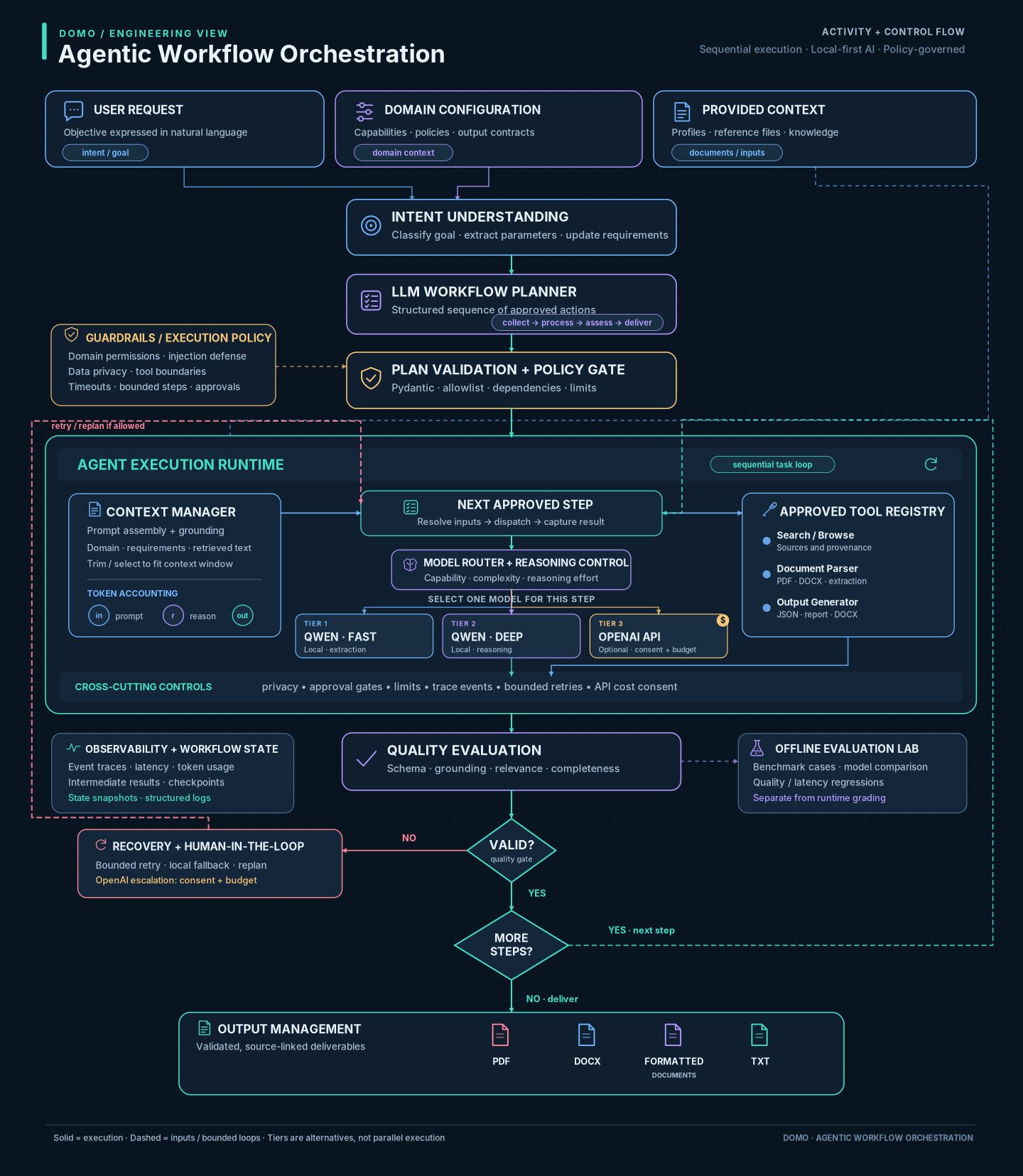
Domo begins by interpreting the user's objective within a selected domain. An LLM generates a structured execution plan, which is validated against available capabilities, domain constraints and execution policies before any action is performed.
The orchestration runtime then coordinates approved tools and language models to execute each task. Context management ensures that models receive relevant information within their context-window limits, while model routing selects the appropriate model and reasoning effort.
Guardrails regulate execution, tool permissions and data handling. Quality evaluation checks results for validity, relevance, completeness and factual grounding. When necessary, controlled recovery strategies can retry an operation or escalate to a more capable model, subject to authorization and cost limits.
The resulting information is delivered as structured data, reports or formatted documents, including DOCX, PDF and TXT.
Natural-language objectives are converted into structured, validated execution plans.
Different models and reasoning configurations can be selected based on task complexity and evaluation results.
Deterministic policies, output validation and semantic evaluation keep execution controlled and results measurable.
Domain-specific configurations define objectives, tools, constraints and outputs while sharing a common orchestration engine.
Domo's AI application is currently designed for local execution using locally installed Qwen models.
An online version is planned, hosted on AWS cloud services and using the OpenAI API for advanced models.
Communication log
No events yet.